Which Shipping Labels Work Best for Your Orders?
A label that peels off in transit, smears after printing, or will not scan can turn a routine shipment into an avoidable customer service problem. If you are deciding which shipping labels to buy, start with the equipment you use, the packages you ship, and the conditions those packages face after they leave your workspace. The least expensive roll is not always the best value if it slows packing or creates delivery issues.
Which Shipping Labels Match Your Shipping Setup?
Most shipping label decisions come down to three questions: What printer do you have? What size packages do you ship? And how many orders do you process in a typical day? Your answers point to the right format faster than brand names or marketing claims.
For many small businesses and home sellers, standard 4 x 6-inch labels are the practical choice. This size gives carriers enough room for the delivery address, barcode, routing information, and service details. It is also easy to apply to boxes, poly mailers, padded mailers, and shipping tubes with a sufficiently flat area.
If you print from a standard office printer, full-sheet labels or half-sheet labels may make more sense. Full sheets work well when you print one or several labels at a time and do not have a dedicated label printer. Half-sheet labels can be useful for pairing a shipping label with a packing slip on the same page, though you should confirm your shipping software supports that layout.
Dedicated thermal printers are generally a better fit for regular shipping volume. They print 4 x 6 labels quickly without ink or toner, and roll labels reduce the handling involved in feeding individual sheets. For a seller packing dozens of orders each day, that time savings adds up. For occasional household returns or a business that ships only a few packages a week, printable sheet labels can be a more sensible starting point.
Choose the Right Label Format
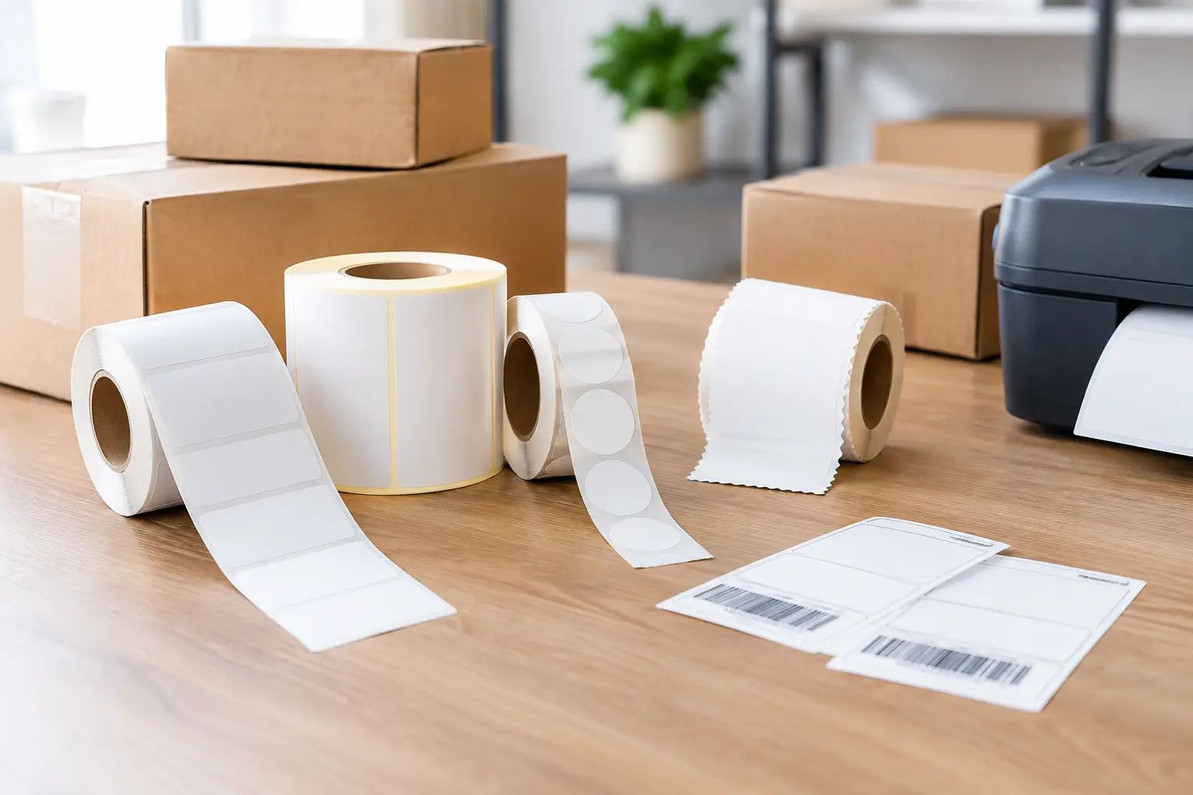
Shipping labels are commonly sold in roll, fanfold, and sheet formats. Each format can produce a readable carrier label, but the best choice depends on the printer and the way you organize your packing station.
Roll Labels
Roll labels are designed for compatible thermal label printers. They feed from a roll and are well suited to a countertop packing area where labels are printed continuously. A roll keeps labels contained, helps prevent bent edges, and takes up little space near a printer. Check the roll core size and the maximum roll diameter your printer accepts before ordering. A label roll that is too large may require an external holder or may not fit at all.
Fanfold Labels
Fanfold labels are stacked in a folded bundle rather than wound on a core. They are a convenient option for thermal printers that feed labels from the rear or from an external stack. Because the stack sits flat, fanfold labels can be a good choice when printer space is limited or when you want to keep a larger quantity of labels ready without changing rolls as often.
Sheet Labels
Sheet labels are made for inkjet and laser printers. They are familiar, easy to store in a desk drawer, and practical for lower-volume shipping. The trade-off is that they use ink or toner and require more attention during printing. If a sheet feeds crookedly or the printer settings are incorrect, barcodes may print too lightly or too close to the edge.
Size Matters More Than Many Shippers Expect
The 4 x 6-inch shipping label is the common standard for a reason: it is large enough for carrier-required information and generally easy for automated systems to scan. It is the best all-around size for most parcel shipping.
Smaller labels can work for return addresses, inventory identification, shelf locations, or compact packaging, but they may not meet a carrier's preferred format for a full shipping label. Avoid shrinking a carrier label just to make it fit a small mailer. Reduced barcodes and compressed text can become hard to scan. Use a larger mailer, place the label on a flat section, or select packaging that gives the shipping label adequate room.
For oversized cartons, a standard 4 x 6 label is still usually appropriate. Apply it to the largest flat side of the box, not across a seam, corner, strap, or taped edge. If the package has a glossy or uneven surface, press the label down firmly, especially along the edges.
Direct Thermal vs. Thermal Transfer Labels
This distinction matters primarily for businesses using thermal printers. Direct thermal labels darken when heat from the printhead activates the label material. They do not require a ribbon, which keeps printing simple and economical for ordinary parcel shipping.
Thermal transfer labels use a ribbon to create the image. They are often chosen when labels need to remain readable for a longer period or withstand more demanding storage conditions. For example, warehouse inventory labels, product identification labels, and labels exposed to heat, sunlight, friction, or moisture may benefit from thermal transfer materials.
For standard carrier shipments, direct thermal labels are often the straightforward choice. The package is normally delivered within days, so long-term print durability is less critical. If you ship items that may sit in outdoor pickup areas or travel through very hot conditions, test a sample label first. Fading or poor barcode contrast can cause scanning problems.
Adhesive Should Fit the Package Surface
A shipping label has to stay attached from pickup through delivery. Permanent adhesive is the usual choice for corrugated boxes, poly mailers, and padded envelopes. It is designed to hold firmly through normal handling and changes in temperature.
Removable adhesive has a place in temporary labeling, such as organizing bins, identifying products before final packing, or marking a returnable container. It is usually not the best option for outbound packages because corners can lift and labels can detach.
Package surface makes a difference. Clean, dry corrugated cardboard is one of the easiest surfaces for label adhesion. Dust, loose fibers, oil, dampness, and wrinkled tape reduce contact with the adhesive. On poly mailers, apply the label to a smooth area with the air pressed out first. On reused boxes, cover or remove old barcodes and shipping labels so scanners do not read the wrong code.
Match Labels to Your Printer Before Ordering
Printer compatibility is the detail that prevents the most frustration. Thermal printer labels are not interchangeable with office-printer sheets, and even thermal models may have different requirements for label width, sensing method, roll core, or media placement.
Before buying, check your printer manual or existing label roll for the supported label width and format. Confirm whether the printer uses roll labels, fanfold labels, or both. If you use an inkjet or laser printer, verify that the label sheets are rated for that print method. Laser printers use heat, so labels not intended for laser printing can curl, peel, or leave adhesive inside the printer.
Also review your shipping platform's print settings. Select the correct 4 x 6 format, sheet layout, or printer model before printing a large batch. Print one test label and inspect the address, barcode, and margins. A barcode should look crisp and dark, with no streaking, missing lines, or accidental scaling.
Practical Buying Tips for Small Businesses and Busy Workspaces
Buying labels in larger quantities can lower the cost per label, but bulk ordering only helps if the labels fit your equipment and storage space. If you are trying a new printer or adhesive, start with a manageable quantity. Once you confirm reliable printing and adhesion, larger packs are a practical way to keep your shipping station stocked.
Store labels in a clean, dry location away from direct sunlight and high heat. Keep roll labels in their packaging until needed so dust does not collect on the adhesive edges. At the packing table, place labels within easy reach of the printer, tape dispenser, scale, mailers, and cartons. A simple layout reduces wasted motion and makes it easier to catch errors before packages are sealed.
For warehouse teams, label consistency also matters. Using one standard label size for outbound parcels simplifies printer settings, training, replenishment, and storage. Keep a second format on hand only when there is a clear need, such as sheet labels for an office printer or smaller labels for internal inventory use.
The right shipping label is the one that prints clearly, sticks securely, and fits the way you work. Whether you are sending occasional returns, fulfilling online orders from home, or managing a busy packing area, choosing compatible labels first helps every shipment leave cleaner, faster, and with fewer preventable problems.
Recent Posts
-

Foam Play Mat Setup Guide for Babies and Toddlers
Once a baby starts rolling, scooting and crawling, the floor becomes the main play area, and hard fl …Oct 24, 2026 -

Folding Table as a Desk: Home Office Setup Guide
Not every home has room for a permanent desk, and not every work-from-home setup needs one. Using a …Oct 24, 2026 -
Duct Tape vs Packing Tape: Which to Use and When
You are halfway through packing a stack of boxes and the packing tape runs out, but there is a roll …Oct 24, 2026