
Samsung Dryer Squeaking or Thumping: Causes and Fix
A Samsung dryer that squeaks, squeals, thumps or rumbles every time the drum turns is telling you something is wearing out. The good news: in most cases the noise comes from a small set of moving parts that support and turn the drum, and the most common culprit, the rear drum rollers, is an inexpensive part many owners replace themselves in an afternoon.
This guide explains what each Samsung dryer noise usually means, how to find the worn part, and how to replace Samsung dryer drum rollers safely.
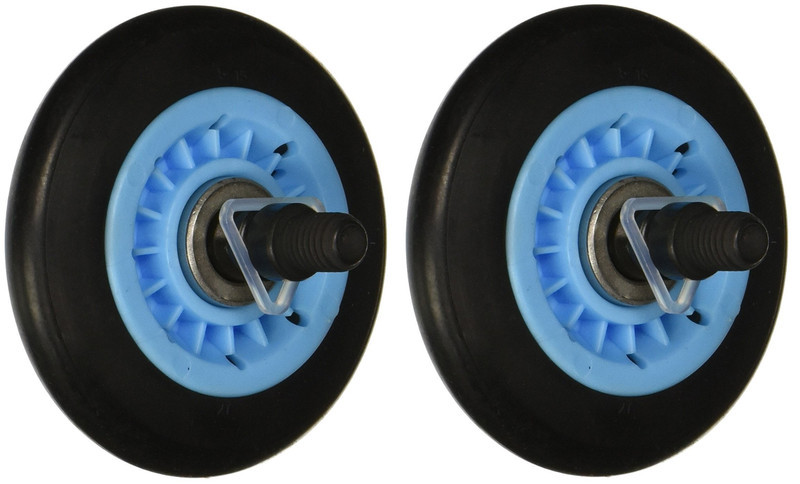
2 Pack Drum Roller compatible with Samsung dryer, part DC97-16782A — Shop now
What Your Samsung Dryer Noise Is Telling You
Before you take anything apart, run the dryer empty for a minute and listen. The type of sound points you toward the part.
- Rhythmic squeak or chirp that matches the drum rotation: usually worn drum rollers or a worn idler pulley.
- Thumping or bumping: drum rollers with flat spots or worn rubber, or a load that is unbalanced (shoes, a single heavy blanket).
- Loud rumbling or roaring: drum rollers or roller shafts that have worn badly, or a failing idler pulley bearing.
- High-pitched squeal that starts at startup: often the idler pulley, the belt, or the motor.
- Scraping or grinding: worn drum glides or felt seals at the front or back of the drum, or a coin, button or underwire caught between the drum and the cabinet.
- Rattling or clicking: loose objects in the drum or in the lint area, or loose cabinet screws.
Most Common Causes of a Squeaking Samsung Dryer
1. Worn drum rollers
On many Samsung dryers the back of the drum rides on two rollers. Every load puts weight on them, and over time the rubber tread wears, the center bore wears, and the rollers start to squeak, wobble or thump. Because both rollers carry the same load, they usually wear out together, which is why rollers are commonly sold and replaced as a pair.
2. Worn idler pulley
The idler pulley keeps tension on the drive belt. When its bearing or wheel wears, it squeals or chirps, often loudest when the dryer first starts. If you are replacing rollers, inspect the idler pulley while the drum is out.
3. Worn drum glides or felt seals
The front of the drum is supported by glides or slides, and felt seals close the gaps around the drum. Worn glides cause scraping and a rough, grinding noise, and you may see black marks or plastic shavings near the front of the drum.
4. Belt wear
A cracked, glazed or frayed belt can slip and squeal. A broken belt usually means the motor runs but the drum does not turn.
5. Something caught in the drum
Coins, hair pins and bra underwires can work through the gap at the drum edge and scrape against the cabinet. Check this first because it costs nothing.
How to Diagnose the Noise Step by Step
- Empty the drum and run it for 30 to 60 seconds. If the noise disappears when empty, the load (shoes, unbalanced bedding) may be the cause.
- Unplug the dryer. For a gas dryer, also turn off the gas supply valve.
- Spin the drum by hand. Turn it slowly with your hand and listen. A squeak or rough spot you can feel through the drum often points to rollers or glides.
- Check the drum edge and lint area for trapped objects.
- Find your model number. On most Samsung dryers the label is inside the door frame or on the back of the cabinet. Write down the full model number, including the suffix.
- Open the cabinet and inspect. With the drum out, spin each roller by hand. Good rollers turn smoothly and quietly; worn rollers wobble, feel gritty or have flat or cracked rubber. Check the idler pulley the same way, and look at the belt and glides.
How to Replace Samsung Dryer Drum Rollers
Disassembly varies by model, so photograph each step as you go. The general process:
- Disconnect power and gas. Unplug the dryer. On a gas model, close the gas shutoff valve. Pull the dryer out far enough to work on it, and disconnect the vent duct if needed.
- Remove the top panel and front panel. On many Samsung models, screws at the back hold the top panel, and the front panel comes off after removing screws and unplugging the door switch harness. Photograph every wire connection before unplugging it.
- Release the belt. Reach under the drum, push the idler pulley to relieve tension, and slip the belt off the motor pulley.
- Remove the drum. Lift the drum out through the front, with the belt still around it.
- Remove the old rollers. Each roller is held on its shaft by a retaining clip. Pry the clip off with a flat screwdriver, slide the roller off, and note any washers so you can reinstall them in the same order. Check the shaft: if it is badly worn or grooved, it should be replaced too.
- Install the new rollers. Slide each new roller onto the shaft, reinstall any washers, and snap a retaining clip firmly into its groove. Spin each roller to confirm it turns freely.
- Inspect while it is apart. Check the idler pulley, belt, glides and felt seals. Vacuum lint from the cabinet floor and around the heater area while you have access.
- Reassemble. Put the drum back, route the belt around the idler pulley and motor pulley in the same path as before, reconnect every harness, and reinstall the panels.
- Test. Restore power (and gas), run the dryer empty, and listen. Then run a normal load.
Samsung dryer drum roller DC97-16782A, sold as a 2 pack — Shop now
The 2 Pack Drum Roller compatible with Samsung dryer is part number DC97-16782A. Its product page lists it as replacing 2027851, DC97-07523A, DC97-07523B and PS4221885, and includes a compatible model table that covers many Samsung dryers and several Kenmore models. Compare your dryer model number and the number on your old roller against that list before ordering.
Safety note: Always unplug the dryer before opening any panel. Dryers run on 240 volts (electric) or connect to a gas line (gas models), so shut off the gas valve on a gas dryer and never work on it with the gas on. If you smell gas, stop, leave the area and call your gas utility. If you are not comfortable with disassembly, have a qualified technician do the repair.
Tips to Keep Your Dryer Quiet Longer
- Clean the lint filter before every load and keep the vent duct clear so the dryer does not run longer than needed.
- Do not overload the drum. Heavy, wet loads put extra weight on the rollers.
- Empty pockets so coins and small hardware do not end up between the drum and the cabinet.
- Replace rollers as a pair, and check the idler pulley and belt at the same time.
Frequently Asked Questions
Is it safe to keep using a squeaking Samsung dryer?
A mild squeak is usually wear, not an emergency, but it gets worse. Worn rollers can damage their shafts and put extra strain on the belt and motor. If you hear grinding, smell burning or see the drum stop turning, stop using the dryer until it is repaired.
How do I know if it is the drum rollers or the idler pulley?
Spin the drum by hand with the belt removed. If the noise is still there, the rollers or glides are the likely cause. If the drum turns quietly without the belt, check the idler pulley and motor.
Should I replace both drum rollers at the same time?
Yes. Both rollers carry the drum and wear at the same rate. Replacing only one often means opening the dryer again soon for the other.
How do I find the right roller for my dryer?
Use the full model number from the label on your dryer and the part number on your old roller, then match them to the part listing. Do not go by appearance alone, because many rollers look similar.
Quiet Your Samsung Dryer Again
Most squeaking and thumping Samsung dryers need nothing more than a fresh pair of drum rollers. Grab your model number and check the DC97-16782A drum roller 2 pack, or browse all dryer and washer parts and appliance parts at Easy Deal USA.
Recent Posts
-

How to Organize Toys With Clear Storage Bins
Toy clutter tends to peak right before the holidays, when birthday gifts from the year are still sca …Oct 23, 2026 -
Folding Chairs for Church Halls and Community Centers
Church halls, fellowship rooms and community centers ask more of their seating than almost any home. …Oct 23, 2026 -
Restaurant Bus Cart Guide: Using a Utility Cart for Bussing
Every busy dining room hits the same wall at some point in a shift: dirty plates stack up, servers m …Oct 23, 2026