How to Print Return Address Labels for Holiday Cards
Holiday cards pile up fast, and hand-writing your return address on fifty or a hundred envelopes takes hours. Learning how to print return address labels at home turns that job into a ten-minute task. With a sheet of 30-up labels and the word processor you already have, you can print a whole season's worth of neat, matching labels in one go and have plenty left for gift packages and bill payments.
Here is a simple, step-by-step method that works with most laser and inkjet printers.

What You Need to Print Return Address Labels
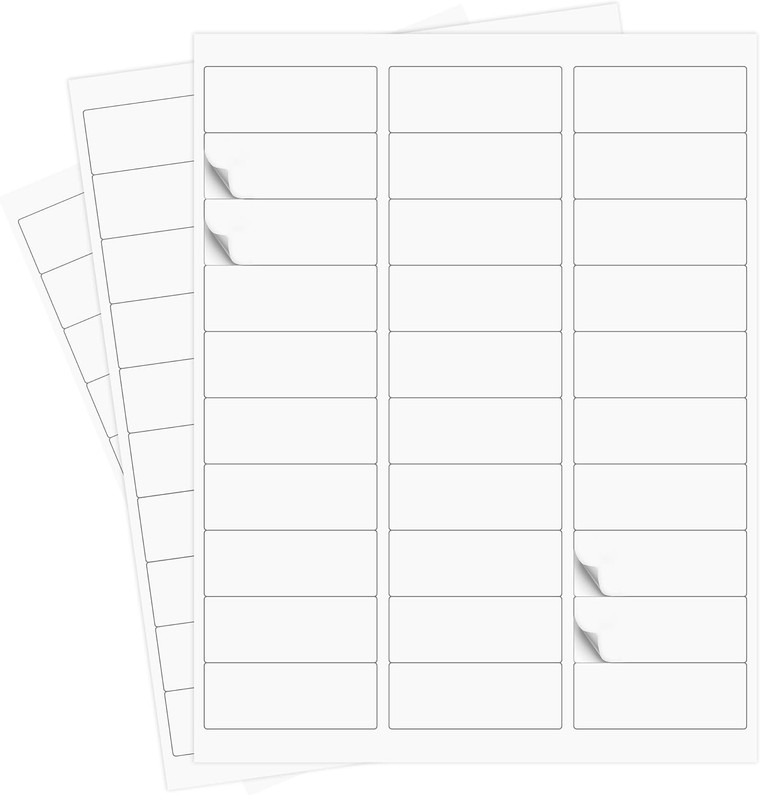
- 30-up label sheets. A 30-per-sheet layout is the standard choice for return address labels because each label is small enough for the top corner of an envelope. Our 30000 Laser/Ink Jet Self Adhesive Labels come 30 labels per sheet on 1000 sheets, for 30,000 labels total.
- A laser or inkjet printer. These labels are made for printing on either type.
- Word processing software with a labels or mailings feature, or a free online label template.
- A ruler. You will use it once to confirm the label size matches your template.
How to Print Return Address Labels Step by Step
- Measure one label. Before you open any software, measure the width and height of one label and count the rows and columns on the sheet. Compare that to the label dimensions listed on the product page. You need a template that matches exactly.
- Open the labels tool. In most word processors this is under Mailings and then Labels, or under a Templates menu. Choose a 30-per-sheet address label template whose dimensions match what you measured.
- Type your return address. Enter your name or family name on the first line, then street address, then city, state and ZIP code. Keep it to three or four lines so the text stays readable.
- Choose "full page of the same label." This option repeats your address on all 30 labels, which is exactly what you want for return labels. It is different from a mail merge, where every label has a different recipient.
- Format the text. Pick a clear font at a size that fits comfortably inside the label with a small margin. Center the text both ways. A festive font is fine for holiday cards, but make sure the ZIP code is still easy to read.
- Print a test on plain paper. Print one page on regular paper, hold it behind a label sheet up to a window or light, and check that every address lands inside its label.
- Adjust if needed. If the text drifts toward an edge, change the top or side margin in the template by a small amount and test again.
- Print on the label sheet. Load one sheet at a time in the correct orientation for your printer. Most printers say on the tray which side faces up.
Tips for Laser and Inkjet Printers
- Set the paper type to labels or heavy paper if your printer offers it. This often improves feeding and toner or ink adhesion.
- With inkjet printers, let the sheet dry for a minute before you peel and stick to avoid smudges.
- Fan the stack of label sheets before loading so they do not stick together.
- Store unused sheets flat in their box, away from heat and humidity, so they stay flat and feed cleanly next time.
Design Ideas for Holiday Return Address Labels
Return labels are a small detail that makes a stack of cards look polished. A few ideas that print well on standard laser or inkjet labels:
- Family name line. Use "The Garcia Family" or "The Smiths" as the first line in a slightly larger or bolder font.
- A simple seasonal accent. Add a small snowflake, star or holly graphic on the left side, then align the address text to the right of it.
- Color with care. Dark text on a white label is the most readable. Keep color for accents, not the address itself.
- Make two versions. Print one holiday design for cards and a plain version for bills and everyday mail so the extra labels are never wasted.
Need Bigger Labels for Holiday Packages
Return address labels are sized for envelopes. For boxes and padded mailers, a larger label leaves room for a full shipping address. Our 6000 Premium Address Shipping Labels measure 3 1/3 x 4 inches, six labels per sheet, and are compatible with both laser and inkjet printers. You can print them with the same labels tool by choosing a matching 6-per-sheet template.

Common Label Printing Problems and Fixes
- Text is shifted on every label. The template does not match the sheet, or the printer is scaling the page. Turn off "fit to page" or scaling and print at 100 percent.
- Text drifts more toward the bottom of the page. The template's vertical spacing is slightly off. Recheck the label height and the gap between rows.
- Sheets jam. Load fewer sheets at a time and make sure no labels have peeled at the corners.
- Ink smears. Choose the label or heavy paper setting and allow more drying time.
Frequently Asked Questions
How many return address labels are on one sheet?
A 30-up sheet holds 30 labels. Our 30-up pack includes 1000 sheets, so one box covers holiday cards, gifts and everyday mail for a long time.
Can I print return address labels on an inkjet printer?
Yes. Our 30-up labels are made for laser or inkjet printers. With inkjet, give the ink a minute to dry before peeling the labels.
What is the difference between a mail merge and a full page of the same label?
A mail merge pulls a different address from a list onto each label, which is what you use for recipient addresses. A full page of the same label repeats one address 30 times, which is what you want for return labels.
Where should a return address label go on an envelope?
Place it in the upper left corner on the front of the envelope, or on the back flap if you prefer. Keep it clear of the stamp area and the recipient address.
Stock Up Before Card Season
A box of labels saves hours every holiday season and keeps your mail looking neat all year. Grab the 30-per-sheet self adhesive labels for envelopes and the 3 1/3 x 4 inch shipping labels for packages, and see everything else you need in our shipping supplies section.
Recent Posts
-
How to Organize Toys With Clear Storage Bins
Toy clutter tends to peak right before the holidays, when birthday gifts from the year are still sca …Oct 23, 2026 -
Folding Chairs for Church Halls and Community Centers
Church halls, fellowship rooms and community centers ask more of their seating than almost any home. …Oct 23, 2026 -
Restaurant Bus Cart Guide: Using a Utility Cart for Bussing
Every busy dining room hits the same wall at some point in a shift: dirty plates stack up, servers m …Oct 23, 2026